
Adventure Architect: Part Thirteen
Interacting with the game world
Well, here we are. Unlucky column number thirteen. Last time, I discussed my theory for character creation, including developing a unique personality, physical appearance, and back story. Flowing directly from that is the subject of this installment: interacting with the game world.
Graphical User Interface
The graphical user interface (GUI) is a technobabble term for the game's method of allowing the user to interact with the game environment. Most adventure games from the "golden age" of the 1980s and early 1990s used one of two basic GUI concepts: the Sierra-style icon GUI or the LucasArts-style word tree GUI.
With Adventure Game Studio (the game engine I'm using for Rise of the Hidden Sun), it's easy to implement either of these GUIs. There are also numerous plug-ins floating around the Web that allow users to import other GUI applications like the LucasArts "verb coin" seen in Curse of Monkey Island. And, of course, those with some programming savvy can always code and design their own GUI.
Since I'm neither all that savvy when it comes to coding, nor all that interested in reinventing the wheel, I decided to stick with the basics provided by AGS. In a head-to-head battle between Sierra-style and original LucasArts style, it's really a matter of personal preference because both have their benefits and drawbacks. As I see it, it breaks down something like this:
1) The Sierra-style icon-based GUI is a simple, mostly unobtrusive way of interacting with the game world in which players simply select an icon ("look") and an object/character ("old prospector") to generate a result. There are a relatively small number of interactive combinations available to the player, and consequently fewer responses to write and code.
2) The LucasArts-style word tree GUI is a more sophisticated (and complicated) tool that allows players to build complex interactions by clicking on a series of words and objects, e.g. "chop down the decidedly strange-looking cactus with the samurai sword." Using this style of GUI usually provides ample opportunity for complex interactions and humor (via word selection and adjectives). The drawbacks, though, are a visually intrusive interface and the sheer amount of responses necessary.
I decided to go with the icon-based GUI made popular by Sierra. It seemed fitting because in many ways this game is a direct descendant of the original Sierra games (as many people have observed, much of the game takes place in Old Sierra Valley, and the name is no coincidence). It also meant I could concentrate on a smaller--though still intimidating--number of interactive combinations. Using the Quest for Glory series as a model, I felt confident that I could still infuse the game with an offbeat sense of humor.
Soon after picking the icon-based GUI, I got to work in crafting the appearance of the icons. The AGS engine comes with default black and white icons similar to those in the very first icon-based Sierra games like King's Quest V and Space Quest IV. These are perfectly functional but--let's face it--pretty ugly.

An example of the plain icon-based GUI of the early 1990s
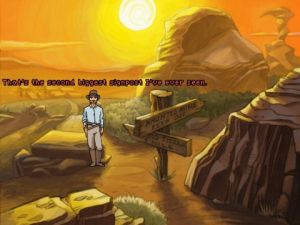
I wanted to create something that would seamlessly fit into the Wild West environment of Rise of the Hidden Sun. After some back and forth discussions about how to accomplish this with one of the project's artists, Dan Lee, we decided to give the icons an old-fashioned distressed leather look. And, instead of the traditional "eye" for the "look" action and "foot" for "walk," I again wanted to create Wild West-specific icons. The result? Seamless GUI icons that enhance, rather than distract from, the game world.

Rise of the Hidden Sun's more sophisticated GUI presentation
One important note about the presence of the GUI panel at the top of the game screen. The AGS engine allows the option to either permanently place the GUI panel on the screen, or hide it until the player moves the mouse cursor to the top of the screen. I chose the latter approach, keeping the GUI as unobtrusive as possible. The player can also select the different icons by right-clicking to scroll through the actions rather than moving the cursor to the top of the screen.
That's all I have for this installment. Next time, I hope to tackle the subject of in-game animations.